Kick Live Viewer Count
Search for a Kick channel to preview the viewer count reported by its current livestream.
Search for a Kick channel above to see its current viewer count.
Why can a viewer count be hidden on Kick?
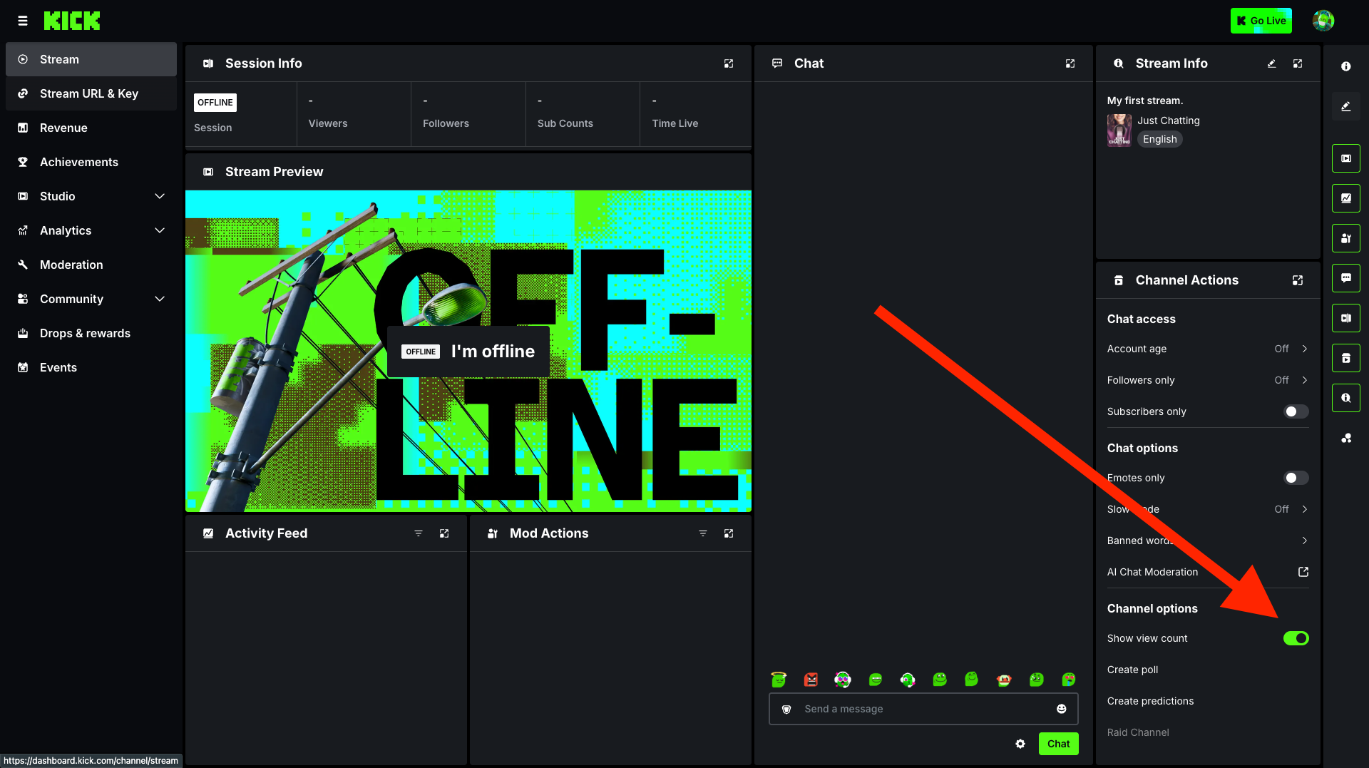
Kick lets creators hide the viewer count displayed on their channel using the "Show view count" toggle under Channel actions in their creator dashboard. Creators can still see their own viewer count in the dashboard.
This page shows the count returned by Kick's public API when available. It does not guarantee that a hidden count can be retrieved or independently verify the audience.
Read Kick's guide to hiding your viewer countHow to hide or show your viewer count
- Sign in to your Kick creator dashboard and open the Stream page.
- Find the Channel Actions panel on the right.
- Under Channel options, find the "Show view count" toggle.
- Switch it off to hide your viewer count, or on to show it again.
- Refresh your channel page to see the change.